How to leverage GitHub Actions to showcase growth of your open-source-first product

The data GitHub quietly throws away
Open your repo’s Insights → Traffic tab. You get a two-week view of clones, visitors, and the referrers sending people your way. It’s genuinely useful. It’s also a sliding 14-day window, and GitHub keeps nothing behind it. The Traffic API is explicit about this: clones and views are retained for 14 days, full stop.
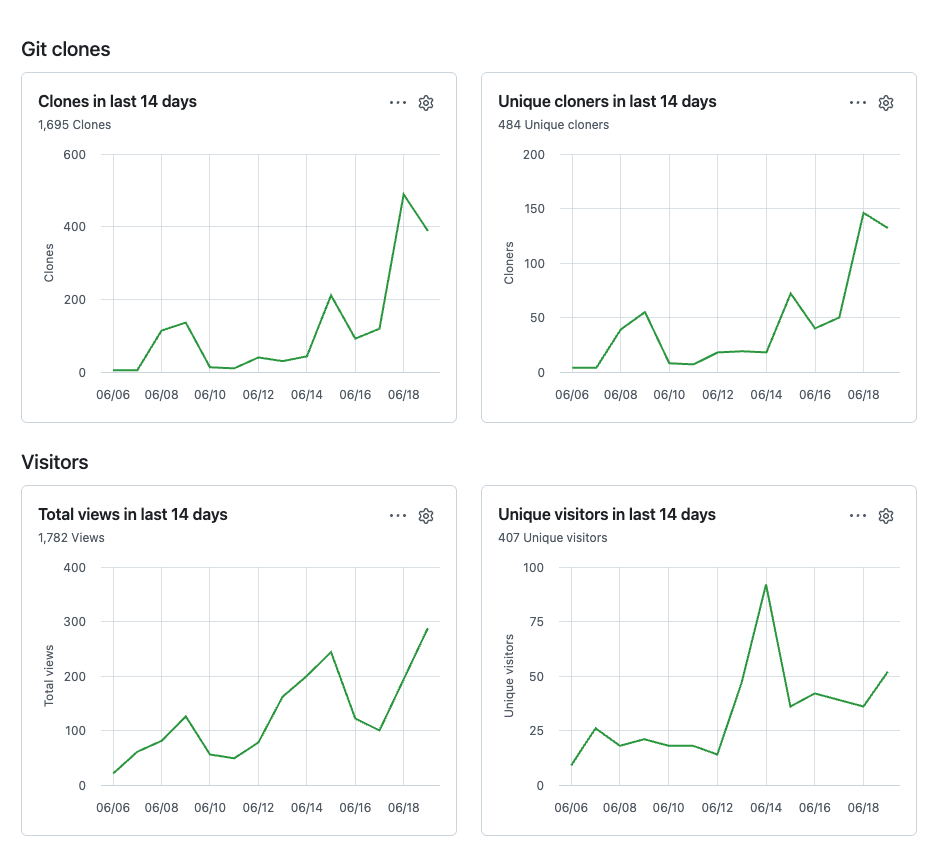
Most maintainers find out the hard way. You ship something, a post or a Show HN lands, and a week or two later you want to look back at the spike to see what it actually did. The window has already slid past it. There is no setting to extend the retention, no export button, and no way to ask GitHub for last month’s numbers. If you didn’t capture it, it didn’t happen.
For a side project that’s a mild annoyance. For a product whose distribution runs through its repo, it’s a hole in the one dataset that matters.
Why this hits open-source-first products hardest
When the open-source repo is the product’s front door, repo traffic is your acquisition funnel. Clones are closer to installs than any vanity metric. Unique visitors are reach. Referrers tell you where attention is coming from. Letting GitHub forget all of that every 14 days means flying the funnel blind.
Four things break without a longitudinal record. Attribution is the first: you publish a blog post or a release and you want to know whether clones moved, which needs a before-and-after you can only draw if you kept the “before.” Referrer diversification is the second: a repo that gets all its traffic from one Hacker News thread is in a different position than one pulling steadily from search, LinkedIn, and direct, and you can’t see which you are from a single 14-day snapshot. Then there are cycle effects. Release weeks spike, weekends sag, and the day-of-week pattern only emerges once you’ve stacked enough weeks to see it.
The fourth reason is the one founders feel later. At some point you’ll be in a conversation with an investor, a potential hire, or a partner, and “the repo is growing” lands very differently when you can show the curve. A screenshot of a 14-day window proves nothing about trajectory. A year of weekly snapshots is an artifact. You only have that artifact if you started keeping it before you needed it.
The naive version, and the two things that break it
The instinct is right and the mechanism is simple: a scheduled GitHub Action that hits the Traffic API on a cadence and commits the result back to the repo as JSON. Cron in the workflow, a small script to fetch the four endpoints, git commit, done.
Two things break that first draft, and both cost an afternoon if you don’t know them going in.
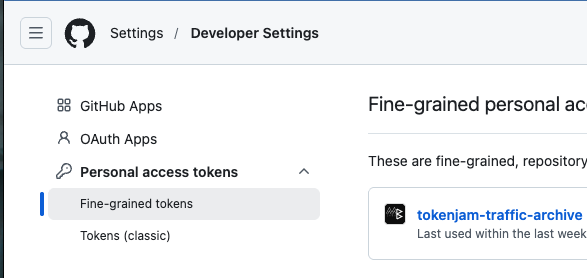
The default token can’t read the Traffic API. Every workflow gets an automatic GITHUB_TOKEN, and your instinct is to use it. The Traffic endpoints require Administration: Read permission, which the default token cannot be granted. There’s no administration key you can add under permissions: in the workflow (putting one there is a parse error), and the default token simply 403s on these endpoints. The fix is a fine-grained personal access token with Administration: Read, scoped to the repo, stored as a secret. One more gotcha inside that gotcha: the token has to be owned by the org that owns the repo. A personal-account token can’t see an org repo and fails with “Resource not accessible by personal access token.”
A protected main won’t take the bot’s push. If your main requires pull requests, enforces status checks, and has enforce_admins turned on, then nothing pushes directly to it, including your workflow. Even an admin-owned PAT can’t bypass classic branch protection in that configuration, which is the whole point of turning it on. So the commit step fails, and now you’re staring at the choice between weakening the protection on your primary branch or giving up on the automation. Both are bad.
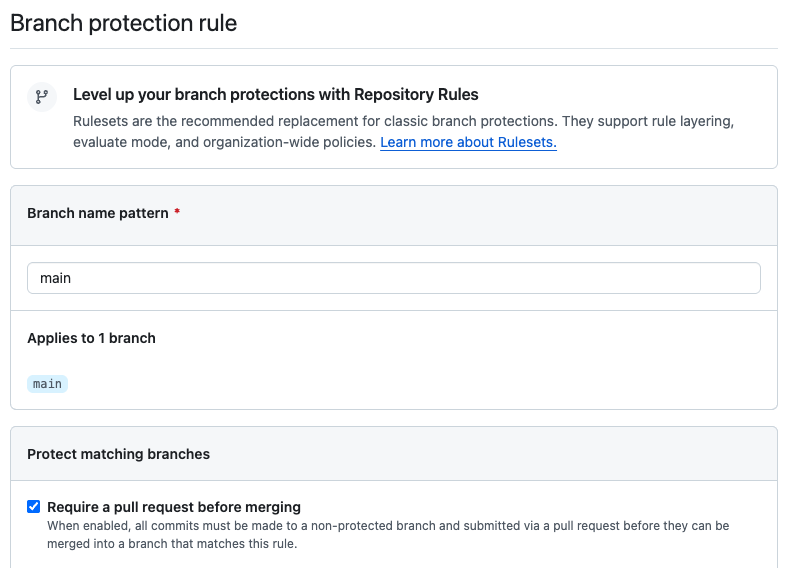
That second problem is the interesting one, because the fix isn’t a workaround. It’s a better design.
Telemetry isn’t code: the orphan-branch design
Here’s the insight that makes the whole thing clean: a weekly traffic snapshot is not source code, and it has no business sharing a ref with your source code.
So don’t commit it to main. Push it to a separate orphan branch instead. An orphan branch has no shared history with main. It’s a parallel timeline in the same repository, with its own commits and, crucially, its own protection policy. In the tokenjam repo that branch is called traffic-data, and it holds one JSON file per week and nothing else.
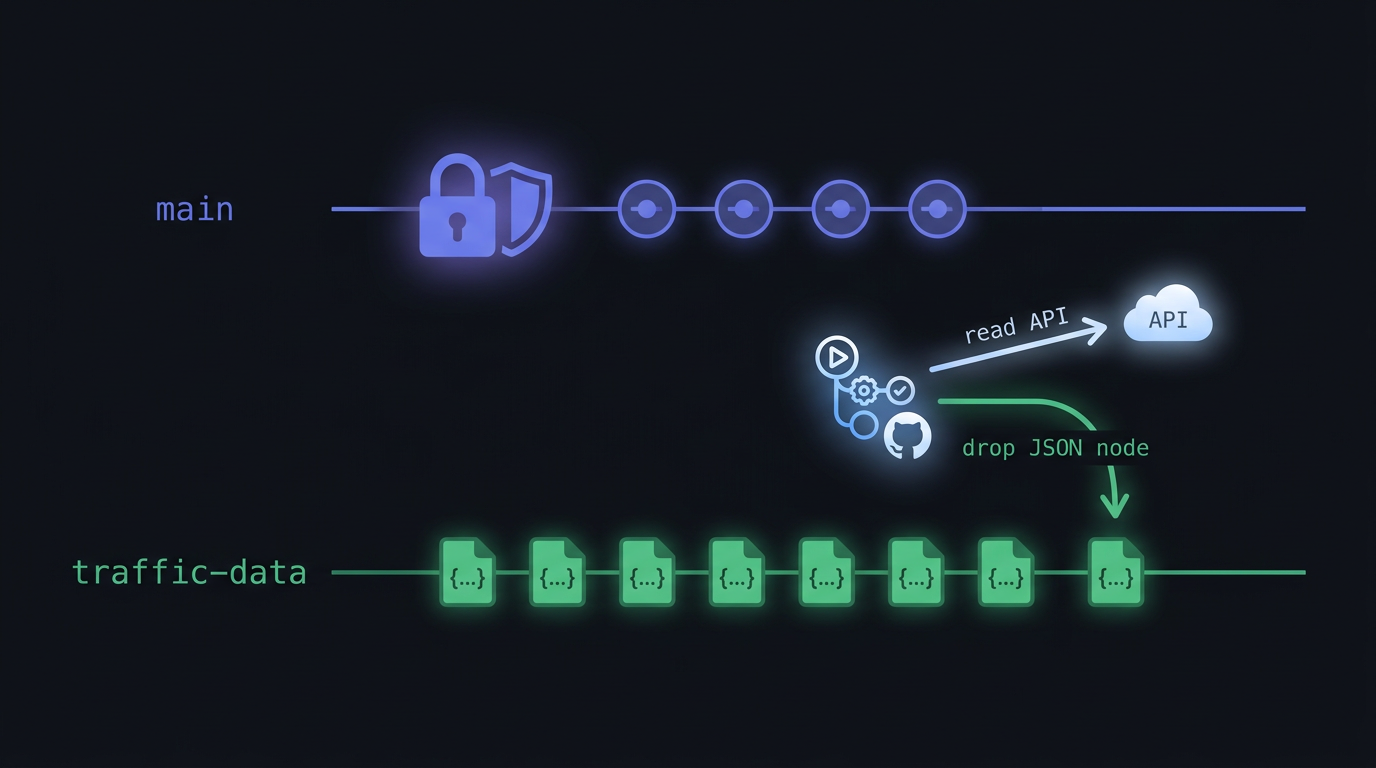
Now the two-token dance falls out naturally. The read step authenticates with the fine-grained PAT, because reading the Traffic API needs Administration: Read. The write step pushes to traffic-data with the ordinary GITHUB_TOKEN, because that branch is deliberately unprotected and contents: write is enough to land a commit there. No protection bypass, no weakening of main, no second admin token for the push. Two refs, two protection policies, no exceptions.
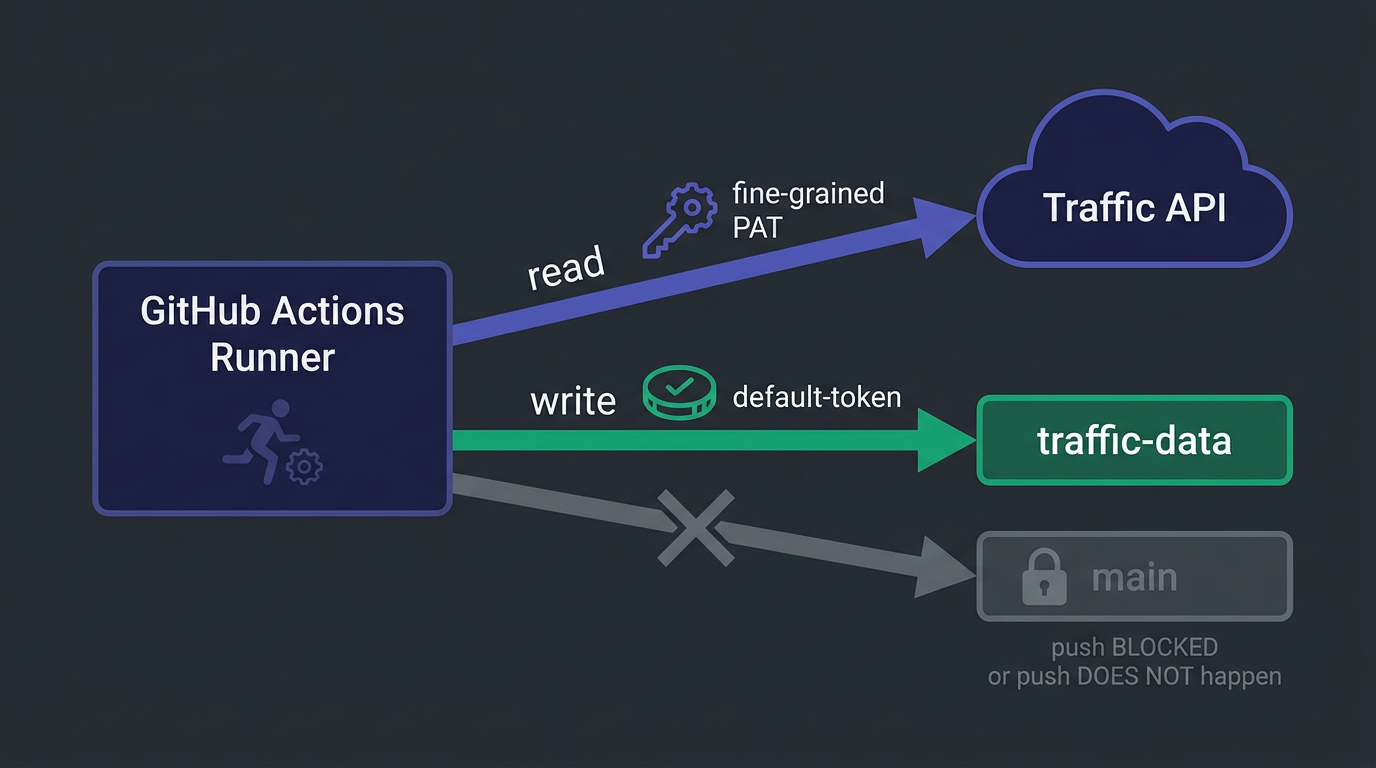
main stays exactly as locked-down as you want it: every change reviewed, every check enforced, the bot nowhere near it. The archive grows on its own branch indefinitely. The two timelines never touch.

Here’s the entire workflow that does it, running live in the tokenjam repo:
name: traffic-archive

# Weekly snapshot of the GitHub Traffic API (which only retains 14 days),
# committed as traffic/<year>-W<week>.json onto the data-only `traffic-data`
# branch (NOT main — main is protected and blocks automated direct pushes).
# See growth/README.md for the schema and how to read the archive.
on:
  schedule:
    - cron: '0 12 * * 0'   # Sundays at 12:00 UTC
  workflow_dispatch:        # manual trigger for backfill / testing

permissions:
  contents: write          # to commit the archive back to the branch

jobs:
  archive:
    runs-on: ubuntu-latest
    steps:
      - uses: actions/checkout@v4

      - uses: actions/setup-python@v5
        with:
          python-version: '3.12'

      - name: Archive traffic data
        id: archive
        env:
          # The Traffic API requires Administration:Read, which the default
          # GITHUB_TOKEN cannot be granted (there is no such permissions: key —
          # a literal `administration` value is a workflow parse error, and the
          # default token 403s on these endpoints). So this step authenticates
          # with a PAT stored as the TRAFFIC_PAT repo secret.
          #
          # TRAFFIC_PAT must be a fine-grained PAT with:
          #   - Resource owner = Metabuilder-Labs (the ORG, not a personal
          #     account — otherwise it can't see this repo: 403 "Resource not
          #     accessible by personal access token")
          #   - Repository access = this repo
          #   - Repository permissions -> Administration: Read (the one the
          #     Traffic API needs; separate from Contents/Metadata)
          # A classic PAT with the `repo` scope also works. The push step below
          # uses the default GITHUB_TOKEN (not this PAT) since traffic-data is
          # unprotected. See growth/README.md.
          GITHUB_TOKEN: ${{ secrets.TRAFFIC_PAT }}
          GITHUB_REPOSITORY: ${{ github.repository }}
        run: python .github/scripts/archive_traffic.py

      - name: Publish the archive to the traffic-data branch
        env:
          # The archive lands on the unprotected, data-only `traffic-data` branch,
          # so the default GITHUB_TOKEN (contents: write) can push it — no PAT and
          # no branch-protection bypass needed. The job runs from main (where the
          # script lives), then publishes just the new JSON to traffic-data via a
          # shallow clone so main's tree never leaks onto the data branch.
          GH_TOKEN: ${{ secrets.GITHUB_TOKEN }}
          GH_REPO: ${{ github.repository }}
          WEEK: ${{ steps.archive.outputs.iso_week }}
        run: |
          tmp="$(mktemp -d)"
          git clone --quiet --depth 1 --branch traffic-data \
            "https://x-access-token:${GH_TOKEN}@github.com/${GH_REPO}.git" "$tmp"
          mkdir -p "$tmp/traffic"
          cp "traffic/${WEEK}.json" "$tmp/traffic/${WEEK}.json"
          git -C "$tmp" config user.name  "github-actions[bot]"
          git -C "$tmp" config user.email "41898282+github-actions[bot]@users.noreply.github.com"
          git -C "$tmp" add traffic/
          if git -C "$tmp" diff --cached --quiet; then
            echo "No changes — archive already current for ${WEEK}."
            exit 0
          fi
          git -C "$tmp" commit -m "chore(traffic): archive week ${WEEK}"
          git -C "$tmp" push origin HEAD:traffic-data
A few details worth pointing at. The job checks out main to get the script, runs it with the PAT, then does a shallow clone of traffic-data and copies only the new JSON into it before pushing. That keeps main’s file tree from ever leaking onto the data branch. The push is idempotent: re-running a week refreshes that week’s file instead of creating a duplicate, so a manual backfire during testing doesn’t make a mess. And any API failure exits non-zero, which shows up red in the Actions tab so a silently-broken archive can’t go unnoticed for months.

What a week of the archive looks like
Honesty first: the tokenjam archive is one week old as I write this. There’s a single full snapshot on the branch, traffic/2026-W25.json. So this isn’t a “look at our hockey stick” section. The point is the pattern of having the data at all, not the size of the number.
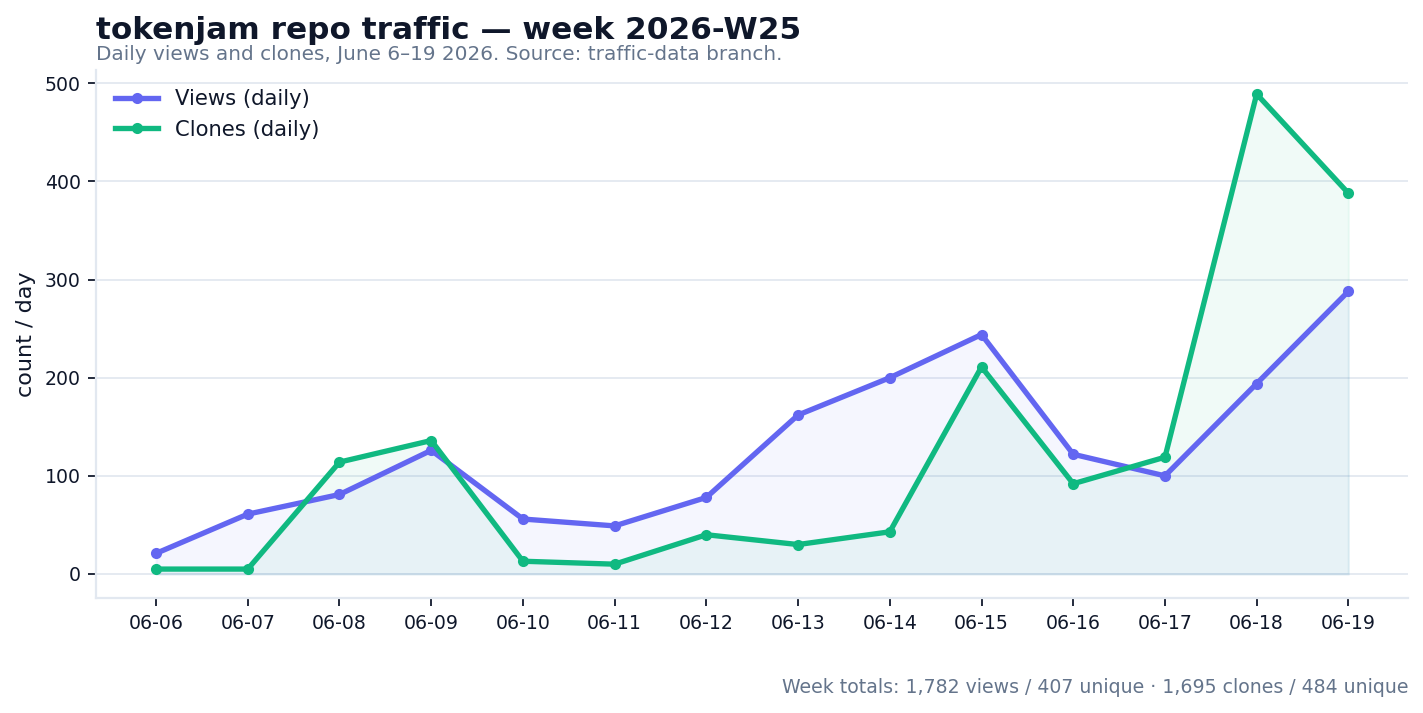
Even one week shows you things the live Insights tab buries. Week 2026-W25 logged 1,782 views from 407 unique visitors, and 1,695 clones from 484 unique cloners. The daily series has clear texture: clone activity jumps on the 8th and 9th, goes quiet midweek, then runs hard on the 18th and 19th (489 and 388 clones). On referrers, github.com dominates at 345 referred views, with Google, LinkedIn, and t.co trailing well behind. That last fact is the kind of thing worth acting on. Traffic that concentrated on internal GitHub discovery is a signal to go diversify the top of the funnel.
In thirty days this becomes a real time series. In a year it’s the artifact you bring to the room. The first commit is the only one that takes any effort.
Setting it up
The full, exact instructions live in growth/README.md in the tokenjam repo, including the precise PAT scoping, the JSON schema, and a few one-liners for reading the archive back. The shape of it is five steps:
- Create a data-only orphan branch (
git checkout --orphan traffic-data, clear the tree, commit an empty README), so the archive has somewhere to live that isn’tmain. - Mint a fine-grained PAT owned by the org, scoped to the repo, with
Administration: Read. Store it as theTRAFFIC_PATrepo secret. - Add the workflow at
.github/workflows/traffic-archive.ymland the fetch script at.github/scripts/archive_traffic.py(stdlib only, nothing to install). - Trigger it once via
workflow_dispatchto backfill the current window and confirm the run goes green. - Leave it alone. It runs every Sunday at noon UTC and drops one JSON per week onto
traffic-data.
Read the README for the parts that bite (the org-owned-PAT requirement especially), then clone the workflow into your own repo and change the owner string.
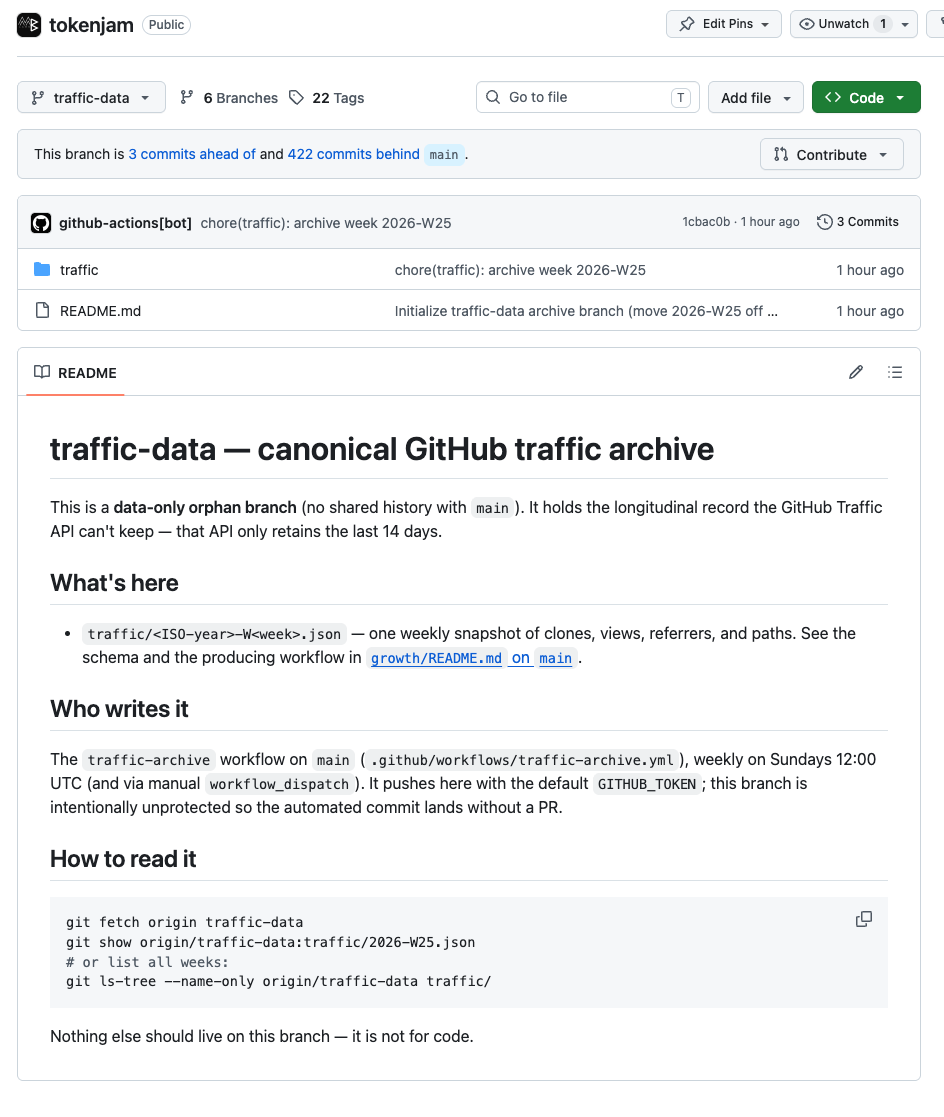
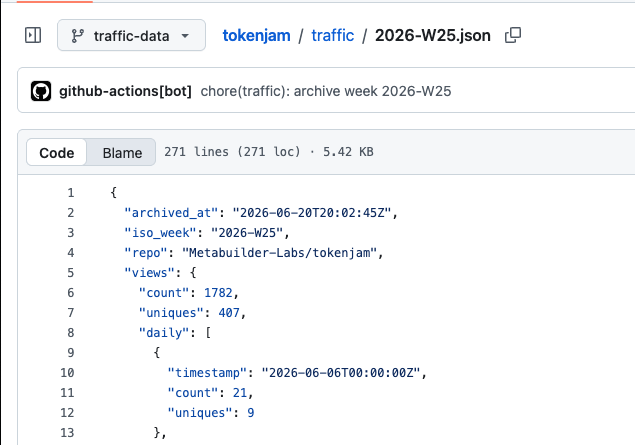
I built this because tokenjam is an open-source-first product. The analyzer is free and MIT-licensed, and the repo is the acquisition funnel, which means I was letting GitHub erase my most important growth data every two weeks. The 50-line action fixed that. If you’re in the same spot, the workflow is at Metabuilder-Labs/tokenjam → .github/workflows/traffic-archive.yml. Steal it; a star is the only thanks I’m asking for. (And if you’d like your AI agents to spend less while you’re in there, that’s what tokenjam itself does.)
Common questions
- Why can't I just use the GITHUB_TOKEN the workflow already gives me?
- Because the Traffic API needs Administration: Read, and the default GITHUB_TOKEN cannot be granted that permission. There's no `administration` key valid under the workflow's `permissions:` block, and the token 403s on the traffic endpoints regardless. You need a fine-grained PAT with Administration: Read, stored as a secret, for the read step. The push step can still use the default token.
- Why an orphan branch instead of just a /traffic folder on main?
- Two reasons. First, a protected main branch blocks the bot's automated push, and you don't want to weaken that protection just to land telemetry. An orphan branch has its own protection policy, so you can leave it unprotected without touching main. Second, the snapshots aren't code and don't belong in your source history, churning your main branch's git log every week. The orphan branch keeps the two timelines completely separate.
- Will this work if my main branch has enforce_admins turned on?
- Yes, and that's exactly the case it's built for. With enforce_admins on, not even an admin PAT can push directly to main. The orphan-branch design sidesteps the problem entirely by never pushing to main. The archive lands on the unprotected traffic-data branch, so the strictest possible protection on main is fine.
- Does committing data to my repo every week bloat it?
- Each weekly JSON is a few kilobytes, and it lives on a separate branch that nobody clones by default. After a year you have ~52 small files on a branch outside your normal workflow. It does not touch the size of a normal clone of main, which only ever sees code.
- What if a run fails or I miss a week?
- The Traffic API gives you a 14-day window, so a single missed Sunday is recoverable. Trigger the workflow manually via workflow_dispatch before the window slides past and it backfills the current period. The script is idempotent, so re-running a week refreshes that week's file rather than duplicating it. A failed run exits non-zero and shows red in the Actions tab so you actually notice.
- Can I push this straight into a dashboard or spreadsheet instead?
- You can, but resist the urge to over-build it first. The committed JSON on the branch is the durable record; everything else is a view on top of it. Pull the files into a sheet or a notebook by hand when you want a growth review. The archive is the part you can't reconstruct later, so get that running before you build anything fancier.
Further reading
- GitHub REST API: repository traffic. The endpoints, and the 14-day retention spelled out.
- Fine-grained personal access tokens. How to scope the
Administration: Readtoken correctly. git checkout --orphan. The one git command that makes the whole design possible.- The tokenjam
growth/README.md. The live setup instructions and JSON schema this post points to.