Model Downsizing: How to Run Cheap Agent Work on Cheap Models
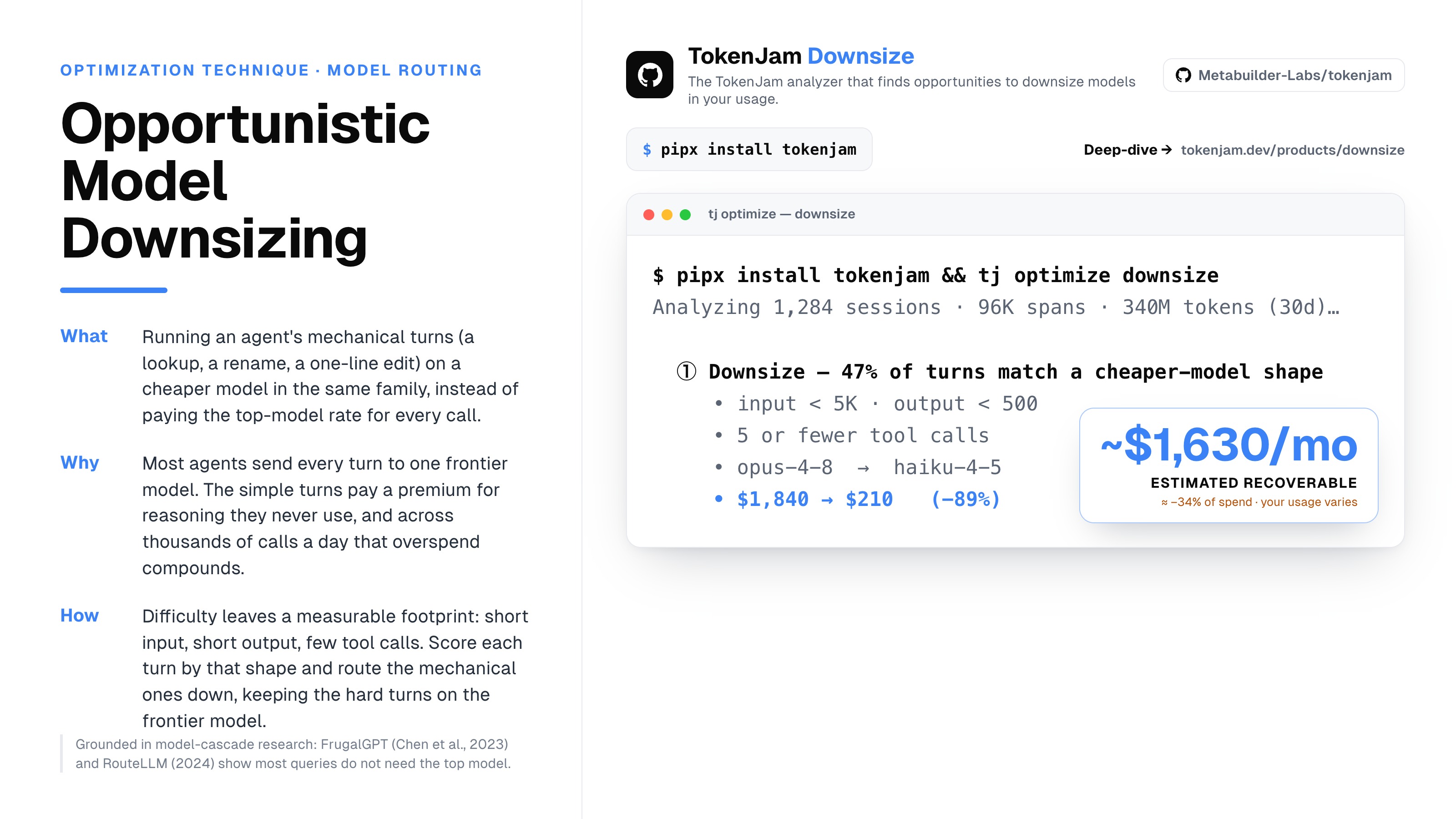
Most agents run on one model, the strongest one, chosen once and never revisited. That default made sense the day you wired the agent, because a wrong answer was the failure that hurt and the top model was the safe pick. Then the agent went to work and started making the same shape of call over and over: a lookup, a field extraction, a one-line edit you already spelled out. Every one of those hits the top model at the top price. Model downsizing is the discipline of finding those turns and asking whether a cheaper model in the same family would carry them. This post is the value-and-mechanism explainer for the downsize lever: what it is, which turns qualify, why the tool refuses to auto-switch, and how to find your own candidates.
What is model downsizing for AI agents?
Model downsizing is running the mechanical turns of an agent on a cheaper model instead of the top one. Not every turn. The specific turns that do a small, well-scoped job and never reach for hard reasoning.
An agent turn is a single call to the model inside a loop. Some turns are genuinely hard: open-ended design, multi-file reasoning, a subtle bug that needs the strongest model to locate. Other turns are mechanical. Pull the order ID out of this blob. Rename this symbol. Apply the patch the diff already describes. When both kinds of turn route to the same top-tier model, the mechanical ones pay a premium for reasoning they never used.
The saving is real and it is per-turn. A single downsized call saves a little. An agent making thousands of mechanical calls a day, each one moved off the top tier, adds up across a month. The hard part was never believing the waste exists. The hard part is knowing which turns, without guessing, and without shipping a quiet quality drop in the process.
Which agent turns are safe to run on a cheaper model?
The honest answer: none are provably safe from a log alone, but the structurally simple ones are the candidates worth reviewing. Difficulty leaves a footprint you can measure after the fact.
A turn that takes 400 input tokens, emits 60 output tokens, and makes one tool call is not doing frontier reasoning. It is doing a mechanical job. A turn that pulls 4,000 tokens of context in, reasons across several tool calls, and writes a long structured answer might be. The features that correlate with difficulty are how much context went in, how much came out, and how many tools the turn touched.
The downsize analyzer reads exactly those features. It flags a turn as a structural candidate when three conditions hold together: input under 5,000 tokens, output under 500 tokens, and 5 or fewer tool calls. Those thresholds are the analyzer’s definition of “structurally simple,” and they are deliberately conservative, so the flag lands on turns that clearly did a small job rather than borderline ones.
A structural match is a signal, not a verdict. A short single-turn call can sit inside a problem where the small model quietly gets the logic wrong. That is why the analyzer flags the turn and stops. It hands you the shape; you supply the judgment about whether the work was as simple as the numbers suggest.
Why doesn’t TokenJam just auto-switch the model?
Because it cannot know the answer would have held, and pretending otherwise is where honest tooling in this space goes to die.
A structural pass reads the shape of a turn that already ran on the top model. To know whether a cheaper model would have produced an answer that held, you have to run the cheaper model on the same task and check the result. The analyzer did not do that. It saw one run, on one model, and measured its shape. Everything about the other model is inference.
So downsize never prints “safe to downgrade,” “would have worked,” or “guaranteed saving.” It prints “candidate,” “structural,” and “review before switching.” The MODEL_DOWNGRADE_CAVEAT line rides along with every finding, in the CLI output and in any config snippet the tool exports, because the moment a tool tells you a swap is safe, it is claiming a counterfactual it never observed. Auto-switching would also make a silent change to your agent’s behavior on your behalf, which is the opposite of what a diagnostic is for. The tool narrows the search from thousands of turns to the handful worth testing. The decision to switch stays with the person who knows the task.
How do you spot downsizing candidates in your own usage?
Run the analyzer against the session history you already have:
pipx install tokenjam
tj onboard
tj optimize downsize
tj optimize downsize walks your captured turns, applies the structural thresholds, and returns the candidates grouped by shape, with an estimated recoverable figure attached. The output is a ranked target list, not a raw bill: here are the turns that match a smaller-model shape, and here is roughly what moving them is worth.
The framing adapts to your plan tier, because the unit that runs out is not the same for everyone. On a subscription plan the scarce resource is your quota window, so the figures render as a token share of your cycle rather than a dollar amount that would misrepresent what a subscription call “costs.” On an API plan you pay real dollars per token, so you see the estimated recoverable spend in dollars. TokenJam derives this from your declared plan and never shows a dollar figure that would overstate a subscription bill.
Everything runs on your machine. The analyzer reads the local history TokenJam captured, computes the findings there, and phones home to nobody. The estimate is grounded in your own traffic, not a generic percentage from someone else’s workload.
What’s the catch with model downsizing?
Structural does not mean quality-equivalent. That is the catch, and it is load-bearing.
The analyzer measures the shape of a turn that ran on the top model. Shape correlates with difficulty; it does not prove it. A turn can look mechanical and still be the one place your task needed the stronger model to get the logic right. So a candidate is a place to look, and the review is a separate step you own. Take a flagged candidate, try the cheaper model on the same kind of work, and check the result against what the top model produced before you change a default. If it holds, you have evidence. If it drops, the flag just saved you from shipping a regression you would have discovered in production.
That restraint is the whole posture of the downsize lever. It reads what it can measure, the shape and the estimated recoverable figure, labels the shape as a signal, and leaves the acting to you. Measure, then validate, then move.
Common questions
- Is a turn that downsize flagged safe to run on a cheaper model?
- No, and the tool will not tell you it is. A flagged turn is a structural candidate, chosen because its shape (input under 5K tokens, output under 500, 5 or fewer tool calls) suggests it did a mechanical job. 'Suggests' is not 'proves.' No pass that reads a log can know the cheaper model's answer would have held, because knowing that requires running the cheaper model on the same task. Treat a flag as a prompt to review, try the swap on your own work, and check the result before you change a default.
- What exactly makes a turn a downsizing candidate?
- Three conditions have to hold together: input under 5,000 tokens, output under 500 tokens, and 5 or fewer tool calls. That is the downsize analyzer's definition of structurally simple. The thresholds are conservative on purpose, so the flag lands on turns that clearly did a small job rather than borderline ones. A turn that misses any one of the three is not flagged.
- How much will downsizing actually save me?
- It depends on your traffic, which is why the tool computes an estimate against your own history instead of quoting a universal number. `tj optimize downsize` shows the estimated recoverable figure for your flagged turns, framed for your plan: a token share of your cycle on a subscription, or dollars on an API plan. There is no fixed percentage, because the saving scales with how many of your turns are mechanical and what you currently pay for them.
- Why doesn't the tool just switch the model for me?
- Because it cannot verify the switch is safe, and auto-changing your agent's behavior on a guess is the opposite of what a diagnostic should do. The analyzer saw one run on one model and measured its shape. It never ran the cheaper model, so it cannot promise equivalence. It flags candidates and prices them; the decision to switch stays with you, the person who knows whether the work was as simple as the numbers suggest.
- Does running downsize send my prompts or usage anywhere?
- No. TokenJam captures locally and `tj optimize downsize` reads that local history. The findings are computed on your machine. There is no signup and no account, and nothing about your prompts or usage leaves unless you export it yourself.
- How is downsizing different from picking a model per turn by hand?
- It is not a replacement for your judgment, it is a way to aim it. Picking well by hand assumes you notice every mechanical turn across a month of sessions you will never re-read. The analyzer surfaces the specific candidates worth a second look and estimates what is at stake, so your attention goes to the turns where a swap would matter most.
Further reading
- Did that session even need Opus?. A deeper cut on the subscription side: finding Opus quota you could reclaim on a Claude Code Max plan, and why every such session is a candidate to review, never a safe downgrade.
- Stop paying frontier-model prices for work a cheaper model handles. The API-builder cut: pricing the dollar delta of downsizing across multiple providers, and the replay step that validates a candidate before you change a default.
- What actually costs money in an agent loop. The mechanism underneath this lever: why per-turn spend, not the monthly total, is the grain where downsizing candidates become visible.
TokenJam is a local-first, OTel-native cost layer for AI agents. No cloud, no signup. pipx install tokenjam, then tj optimize downsize to see which of your own sessions look like downsizing candidates.