What is human-in-the-loop for AI agents?
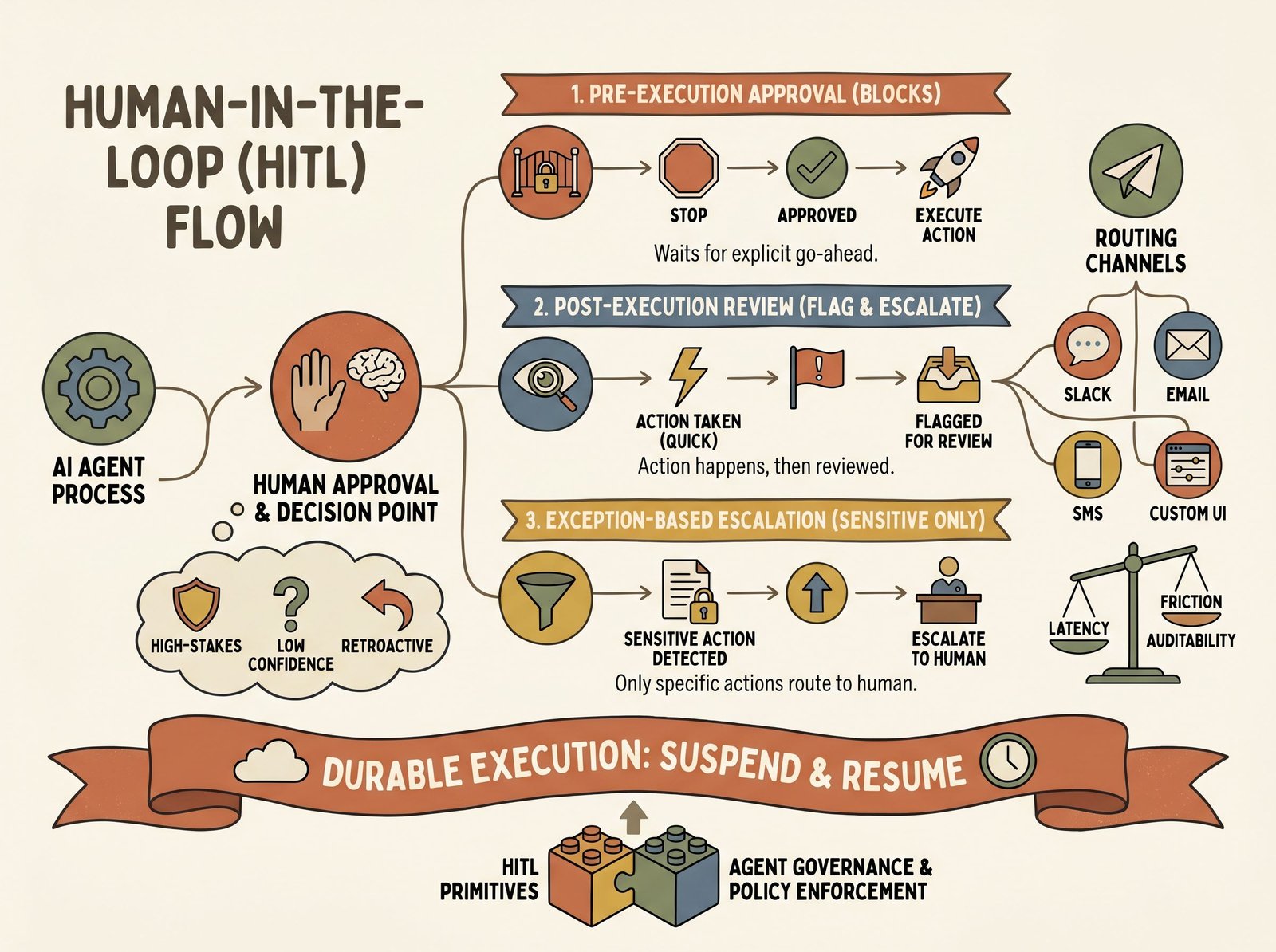
Why HITL matters for production agents
Even well-tested agents make mistakes. A model might misinterpret a user request, hallucinate an action, or hit an edge case the training data never covered. In low-stakes contexts (generating a report, drafting an email), mistakes are annoying. In high-stakes contexts (sending customer communications, deleting database rows, initiating financial transfers), mistakes are costly.
Consider a customer-support agent that composes and sends email responses. The agent may be 99% accurate. That 1% error could send a rude or inaccurate message to a paying customer, damaging trust and creating extra work to undo. A financial agent may correctly categorize most transactions, and one misclassified refund could still throw off an audit. An administrative agent tasked with purging old files might delete something recent if its date parsing fails.
HITL creates a human checkpoint before or after such actions. A human reviews a draft email before send, flags a suspicious transaction after the fact, or interrupts the agent before it deletes a file. This is not about removing trust from the agent. It’s about accepting that perfect automation is rare, and pairing the agent’s speed with human judgment where it matters most.
Three patterns
Pre-execution approval
The agent pauses before executing a high-stakes action and requests explicit human approval. The human reviews the proposed action, context, and reasoning, then approves or rejects. The agent only proceeds if approved.
Example: A billing agent proposes to refund a customer’s subscription. It drafts the refund request, displays the amount, reason, and customer history, then waits for a human accountant to click “approve” or “reject” via Slack. Once approved, the agent executes the refund. If rejected, the agent logs the decision and may retry with a modified request or escalate further.
Pre-execution approval is high-friction and lowest-risk: no unintended actions slip through. It suits infrequent, high-value decisions.
Post-execution review
The agent executes an action, then a human reviews the outcome retroactively. If the human spots a problem, they flag it and the agent can undo, correct, or escalate.
Example: A content-moderation agent flags user comments as spam or policy-violating and removes them. A human reviewer checks a sample of removed comments each day. If the human spots a false positive (a legitimate comment that was wrongly removed), they restore it, log the error, and the agent adjusts its thresholds or retrains. If the human spots a genuine miss (spam that was not caught), they delete it and the agent logs the gap.
Post-execution review is lower-friction than pre-approval. The agent moves fast. The risk is higher: bad actions have already happened. It suits high-volume, lower-risk operations where human review is asynchronous and sampled rather than exhaustive.
Exception-based escalation
The agent runs normally. If it detects low confidence, a sensitive category, or a policy violation, it escalates to a human before proceeding. This hybrid approach reserves human time for the cases that need it.
Example: A hiring-pipeline agent screens resumés and schedules initial interviews. Most resumés are clearly unqualified or qualified, and the agent processes those automatically. If a resumé is borderline (confidence between 40–60%), or the candidate is internal staff applying for a different role (flagged as sensitive), the agent pauses and sends an approval request to the hiring manager. Once approved, it advances or rejects the candidate. If not approved within 48 hours, the agent escalates to HR or applies a default action.
Exception-based escalation balances speed and oversight. Most work is automated. Edge cases get human eyes.
Approval channels and their tradeoffs
Humans can approve actions through several channels, each with its own latency, friction, and auditability profile.
Slack: Fast, ambient, and familiar for teams. An agent posts a message with action details and two buttons: “Approve” and “Reject.” A human sees the notification, clicks a button, and the agent resumes. Slack suits small, quick decisions (approve a single email, confirm a deletion) and teams already living in Slack. Tradeoff: if the person is offline or drowning in messages, approval latency spikes. The audit trail is tied to Slack’s message retention policies.
Email: Lower friction than dedicated UIs, familiar, and works across time zones. The agent sends a structured email with action details and a unique approval link. The human clicks the link, authenticates if needed, and confirms or rejects. Email suits asynchronous workflows where a few hours of latency is acceptable and audit trails matter. Tradeoff: email can be slow and noisy, and there’s phishing risk if links are not properly verified.
SMS: Fastest for urgent decisions. The agent sends a one-liner (“Refund $50 to customer X?”) and a link. The human replies or clicks. SMS works for on-call scenarios, high-stakes interrupts, and people who respond faster to texts than messages. Tradeoff: limited context fits in an SMS, so it’s useful only for binary decisions or actions with very short descriptions.
Telegram or custom UIs: Telegram offers a middle ground: richer than SMS, less dependent on corporate infrastructure than Slack. Custom UIs (a simple web dashboard) give full control over presentation and can display detailed context, timelines, and audit logs. Tradeoff: custom UIs require infrastructure and don’t leverage channels teams already use. Telegram adds a third platform to monitor.
Practical guidance: Start with the channel your team already uses (Slack for most teams). If latency is critical, add SMS for escalations. If audit requirements are strict, add email with signed links. Don’t multiply channels unless necessary. Too many approval surfaces fragment attention.
The async-execution problem
An agent proposes an action at 2 PM. A human approves it at 4 PM. The agent should not lose that approval or hang indefinitely waiting.
This is the async-execution problem: agents have to suspend, preserve state, wait hours or days for human approval, and resume cleanly. If your agent process restarts while waiting, the approval is lost. If the agent is polled constantly, it burns compute.
Durable execution is the solution. The agent writes its pending action and request ID to a durable store (database, persistent queue, event log). It includes a callback URL. When a human approves, the system calls that URL with the request ID and decision. The agent resumes from that callback, looks up the stored request, and executes it.
Example architecture:
- Agent calls tool
request_approval(action_id="transfer_5k", amount=5000, recipient=customer_id). - System generates a unique request ID, stores it with full context, and sends an approval request to Slack.
- Agent yields control and waits. The process can terminate; state is persisted.
- Human approves via Slack at 4 PM; the Slack button posts to a webhook.
- Webhook handler looks up the request, checks it is still valid, and calls the agent’s resume callback with the decision.
- Agent resumes, executes the transfer, and logs the outcome.
This design survives crashes, allows long waits, and scales to thousands of concurrent approvals. Most production HITL tools handle this internally. You call an approval function and the framework handles persistence.
Notable tools
HumanLayer provides a decorator pattern for approval. You mark a function with @hl.require_approval() and it blocks until a human approves via Slack, email, SMS, or Discord. HumanLayer handles persistence, multi-channel routing, and callback logic. It works with any Python LLM framework and is open-source. See HumanLayer on GitHub. HumanLayer also ships the Agent Control Plane (ACP), a Kubernetes-native scheduler for unsupervised agents that builds on the same approval primitives.
OpenAI Agents SDK includes native HITL primitives. You set require_approval="always" on a tool, and the SDK pauses execution and surfaces the approval request in the RunState. The SDK handles session persistence so approvals survive multiple turns. It supports tool-level and nested-agent approval. See OpenAI Agents SDK HITL docs.
Permit.io is primarily an authorization and access-control platform. It includes an MCP (Model Context Protocol) server that wraps access requests as agent tools. Tools must pass Permit’s policy engine before execution, and policies can require human approval via a dashboard UI. Permit logs every decision and policy change for audit. It pairs well with LangGraph or other frameworks. See Permit.io HITL blog.
The three tools sit at different points: HumanLayer for speed and multi-channel routing, the OpenAI Agents SDK for tight integration with OpenAI’s stack, Permit.io for organizations with strict compliance or fine-grained access-control needs.
HITL as a wedge into governance
Once you have approval primitives, you have most of what you need for policy enforcement. An approval request is a checkpoint where policy rules can be checked and logged. A human approver can be a policy enforcer: they don’t approve or reject on gut feel, they decide against a policy document.
A finance policy might state: “Any expense over $5,000 requires approval from a director; over $25,000 requires approval from the CFO.” An agent encodes these rules as escalation logic. Expenses under $5,000 auto-approve. $5,000–$25,000 routes to a director. Over $25,000 routes to the CFO. The agent does not guess; it follows policy.
This is the foundation of agent governance: policies define what an agent can and cannot do, HITL enforces those policies at runtime, and audit logs prove compliance.
Common questions
- When should I add HITL to my agent?
- Start with high-stakes actions: money, data deletion, external communication. Add HITL if the cost of an error (customer damage, compliance violation, data loss) is high, or if the action is infrequent enough that human review doesn't create a bottleneck. For low-stakes actions (generating a draft, internal logging), HITL is usually overkill.
- My agent is stuck waiting on an approval nobody answered. What happens to it?
- Whatever you designed it to do, which is the point: you have to design it. An approval request that never gets answered needs a timeout and a default action. Common patterns: after N hours, escalate to a second approver (the original approver's manager, or an on-call rotation); after a longer window, apply a safe default (reject the action, or take the conservative branch); for genuinely blocking work, fail the task and surface it to a human queue. The mistake is leaving the timeout undefined. Then the agent either hangs forever (burning a durable-execution slot) or a process restart loses the pending state entirely. Decide the timeout and the default when you add the approval gate, not after the first one strands a task over a weekend.
- Can HITL be automated for low-risk cases?
- Yes. Use tiered approval: low-risk actions auto-approve or require only post-execution review. Medium-risk actions route to a junior approver or a policy engine. High-risk actions route to a senior human. You can also use agent confidence: above a threshold, auto-approve; otherwise, escalate. This blends human judgment with automation.
- How do I keep approval requests from burying my team in Slack pings?
- Approval fatigue is real. A team that gets 80 approval pings a day starts rubber-stamping them, which defeats the point. Three levers. First, raise the threshold: if 90% of requests get approved without changes, the gate is too sensitive, so move more actions to post-execution review or auto-approve. Second, batch: instead of one ping per action, send a digest ('12 refunds pending, total $940, review all') that a human clears in one pass. Third, tier by reviewer: route low-value approvals to a junior queue or a policy engine, reserve senior humans for high-stakes calls. The signal you've got the balance right is that approvals feel meaningful: each one is a real decision, not a reflex.